
Our market analysis, under your brand, on your site and in MT5
For forex and CFD brokers, introducing brokers and prop firms: support and resistance, key zones, pivots, volatility and currency strength for 28 forex pairs and gold, shown to your clients in your colors, on your website and inside MetaTrader 5. Levels and context, not signals.
- 28 forex pairs and gold
- Your logo, colors and language
- The MT5 tool never trades
What your clients would see
The widget itself, running on our current analysis for 28 forex pairs and gold, not a mock-up. Pick a market and switch the colors to see how it reads under different brands: in your build, your logo and your language take the place of the sample brand.
Levels and zones refresh every 3 hours on weekdays, volatility and currency strength every hour. The “Powered by” line at the foot of the widget is optional: without it, your clients see only your brand.
The same levels, inside MetaTrader 5
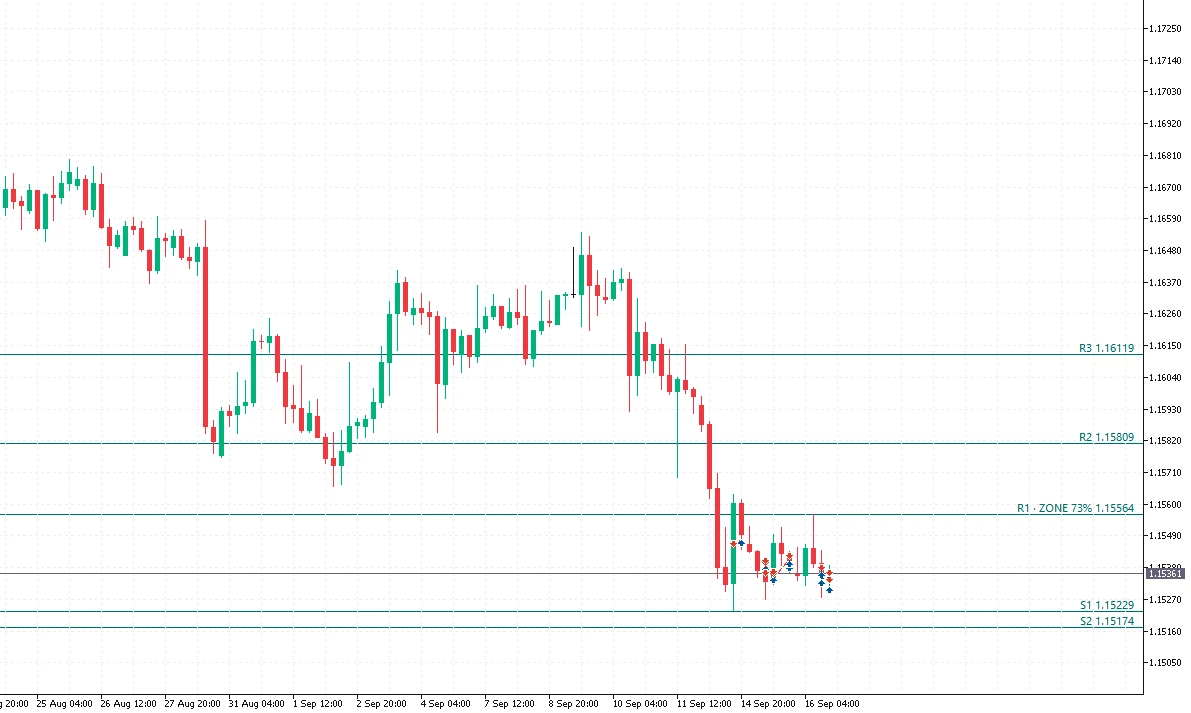
A tool under your name for your clients’ MetaTrader 5. It draws the levels, key zones and pivots on any chart, alongside whatever your clients already run. It works only on accounts of your MT5 servers and has no trading functions: it never opens, modifies or closes an order. Your clients only ever see your name and your web address.
What is included
- Support and resistance levelsFrom our AI analysis: up to three per side, nearest first, each with its distance in pips (points for gold).
- Key zonesPrice areas where several factors meet, with a confluence score: 30-day Fibonacci retracement, recent candlestick pattern, round number, past price tests.
- Daily pivot pointsFive families for every market: classic, Fibonacci, Camarilla, Woodie and DeMark, from the last daily candle.
- VolatilityThe ATR on the hourly, four-hour and daily timeframes, with its regime (low, normal, high, extreme) and where it stands against recent readings. Updated hourly.
- Busiest hours of the dayThe typical range of each hour of the trading day, measured over the last three weeks, with the four trading sessions.
- Currency strengthThe eight majors, USD, EUR, GBP, JPY, CHF, CAD, AUD and NZD, on several timeframes. Updated hourly.
How it works
- Your websiteThe analysis page and single widgets are added to your site with a snippet we provide. They carry your logo, colors and language and work only on your own domains.
- Your clients’ MetaTrader 5You give your clients a small tool under your name. After a short, guided setup, the levels, zones and pivots appear on their charts. Nothing in it trades.
- We handle the setupYou send us your logo, colors, languages and your server’s symbol names. We build and brand the package; your clients only ever see your name and your web address.
We host and update everything. The technical steps come with our offer, by email.
What it is not
- No buy or sell signals, no trade ideas, no AI trade plans, no direction.
- No price feed and no price history: we do not resell quotes.
- No retail-sentiment data and no economic calendar in this package.
- No trading functions: the MT5 tool never opens, modifies or closes an order.
For your compliance team
Nothing in the package says buy or sell. Levels, zones, pivots, volatility and currency strength describe the market; they do not recommend a trade, so they are market context rather than investment advice. With the agreement you receive a compliance pack for your review.
- Methodology document: source of the levels, refresh cadence, what they are not
- Disclaimers in your languages
- Our written assurance that the MT5 tool has no trading functions
Timeline and pricing
The package is built and branded for you after signing: web components within two weeks, the MT5 tool within three weeks. Pricing is not published on this page: the monthly license depends on your number of active clients. Submit the form and our offer, with the setup fee, the license for your size and the terms, is emailed to you right away.
Request the offer
Tell us about your company, your platforms and your languages. The offer is sent to your business address automatically, and every request is read by a person.
What happens next
- You submit the form; our offer with the terms arrives by email.
- You reply with your questions, or to confirm you want to go ahead.
- We send the agreement and the compliance pack for your review.
- After signing: web components within two weeks, the MT5 tool within three weeks.
Questions
How is the web part installed?
With a snippet we provide, placed where the analysis page or a single widget should appear on your website. We host and update the content. The widgets work only on the domains you register with us, so the code cannot be reused elsewhere. The technical steps come with our offer by email.
How do clients install the MT5 tool?
It is a short, guided setup: your clients add a small tool under your name to MetaTrader 5, and the levels, zones and pivots appear on any chart they open, alongside whatever they already run. It works only on accounts of your MT5 servers. The technical steps come with our offer by email.
Does it work with MT4 or cTrader?
Today the tool is built for MetaTrader 5 only. The web components are independent of the platform: the analysis page and the widgets work on your website whatever your clients trade on.
Which languages are available?
English plus one more language of your choice are included; further languages on request. Tell us which ones in the form and we set them up with your logo and colors.
What happens if we stop?
We switch off your access. From that moment the widgets on your website and the MT5 tool in your clients’ terminals stop receiving data. The duration of the license is set out in the agreement.
Do our clients see Forex Sentiment anywhere?
No. The web components carry your logo, colors and language, and the MT5 tool carries your name. Inside MetaTrader, the web address your clients see is on your own domain, not ours. A small “Powered by” line is optional, at your choice.
The analysis provided under this package is market context, not investment advice, and contains no recommendation to buy or sell. Trading foreign exchange and CFDs carries a high risk of loss. Each broker remains responsible for the disclosures required by its own regulator.