
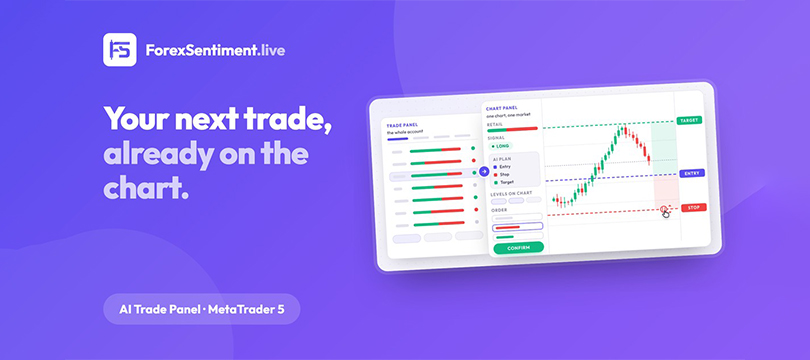
Anyone who trades forex by hand knows the routine. The analysis is read on a website; the trader goes back to the platform; entry, stop and target are copied by hand, hoping not to mistype a digit; the lot is worked out to respect the risk decided in advance; the right order type is picked; and then the whole thing starts again for the next pair. It is repetitive work, and it is also where many small, expensive mistakes are born. The Trade Panel published by this site exists to remove that routine: it brings retail positioning, the signals and the AI plan of the day into MetaTrader 5, with the order already filled in and the risk arithmetic done.
This walkthrough goes screen by screen: what the panel puts on a chart, how an order goes out, and, above all, what it does and does not do. The most telling thing about this tool is not what it promises but what it declares it will never do. What a trade panel should do in general, and how this one compares with the alternatives, is covered in the full MT5 trade panel guide.
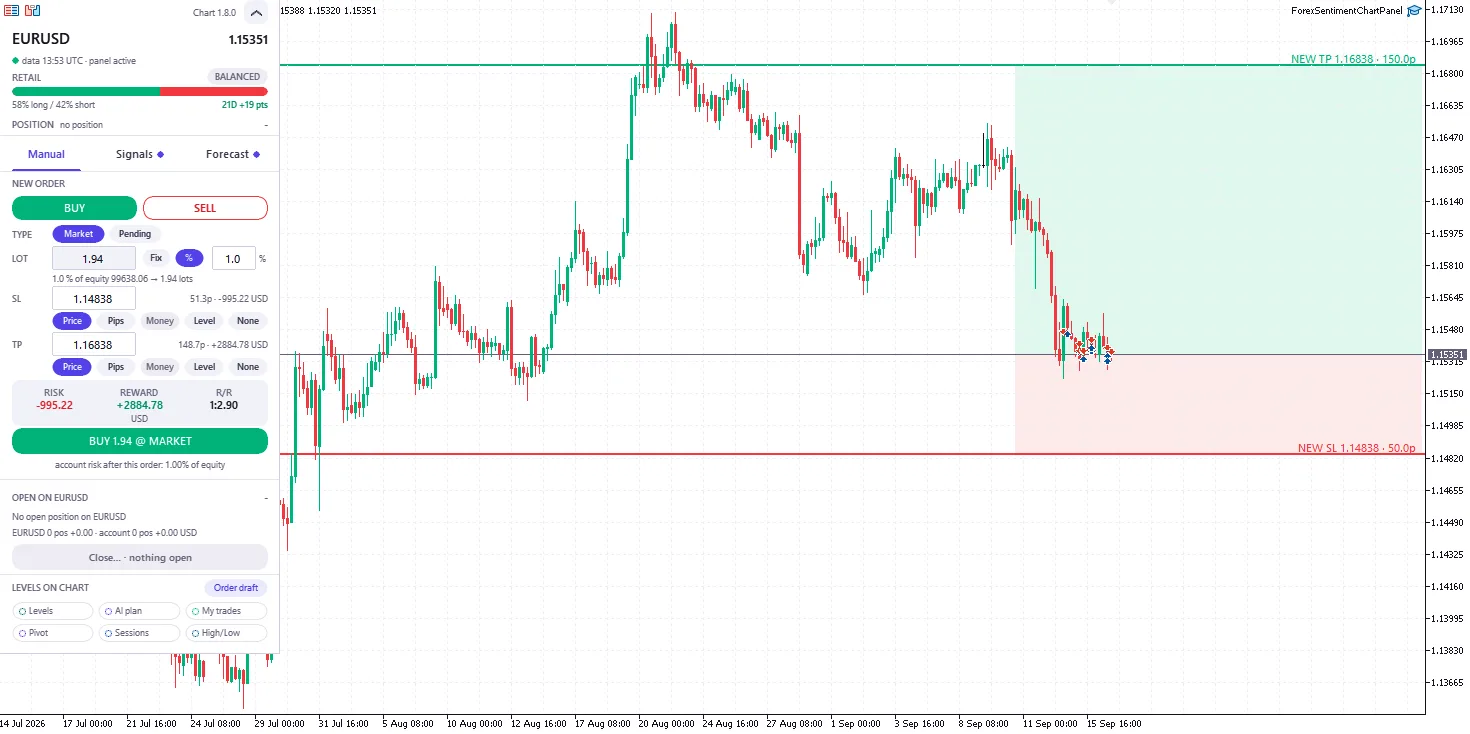
The Chart Panel on EUR/USD, mid-September 2026: the retail bar at the top, a manual order sized from a 1% risk, and the shaded risk and reward of the draft on the candles.
Two Expert Advisors, One License
Technically, this trade panel for MetaTrader 5 is two Expert Advisors that work together, delivered in one zip file and activated with one license code. The first is the Trade Panel proper. It sits on any one chart and from there covers the whole account: for 29 markets (the 28 currency pairs this site tracks plus gold, XAUUSD) it shows how retail traders are positioned, the signal for each market (long, short or neutral) and the AI plan of the day, with the order form already filled in. Its five tabs are Sentiment, Signals, AI Forecast, Positions and Manage.
The second is the Chart Panel, introduced with version 1.8.0 and included in the same license. It is a narrow side panel added to each chart the trader actually works on. It shows the same three things (positioning, signal and plan) for that chart's market only, and it draws the levels on the candles: the support and resistance from the site's analysis, the levels of the AI plan, the daily pivot taken from the broker's daily bar, the highs and lows of the day and of the week, the four trading sessions (Sydney, Tokyo, London and New York) as outlined boxes, and the trader's own positions. An order can be composed by dragging lines on the chart. The current version, as of September 2026, is 1.8.1.
Where the data comes from deserves a plain statement. It comes from this website, which about every three hours on weekdays publishes retail positioning and a signal for the 29 markets, built from five factors: positioning read the contrarian way, currency strength, chart patterns, support and resistance, and high-probability zones. Every trading evening, Sunday to Thursday, an AI model writes the plan for the next session. The data is not real-time, and the panel does not pretend otherwise: every row carries the age of the analysis it came from. What the retail positioning number is made of, and why it is read against the crowd, is explained in a separate article.
What a Row Shows
On the Sentiment tab each market is a split bar: the share of retail traders long in green, short in red, with a chip that reads Balanced, Crowded or Extreme as the imbalance grows, and the history over 7, 21 or 30 days. On the Signals tab the same market gets its direction with a confidence level, a volatility chip, the analysis price with its age and the distance to the current price, the nearest support and resistance, and the reasoning behind the reading. Expanding a row opens the order form: in Auto, stop and target are pre-filled from the published support and resistance levels, with a minimum stop distance and a ratio of at least 1:1, and they can instead be pinned to another published level or set in pips or money.
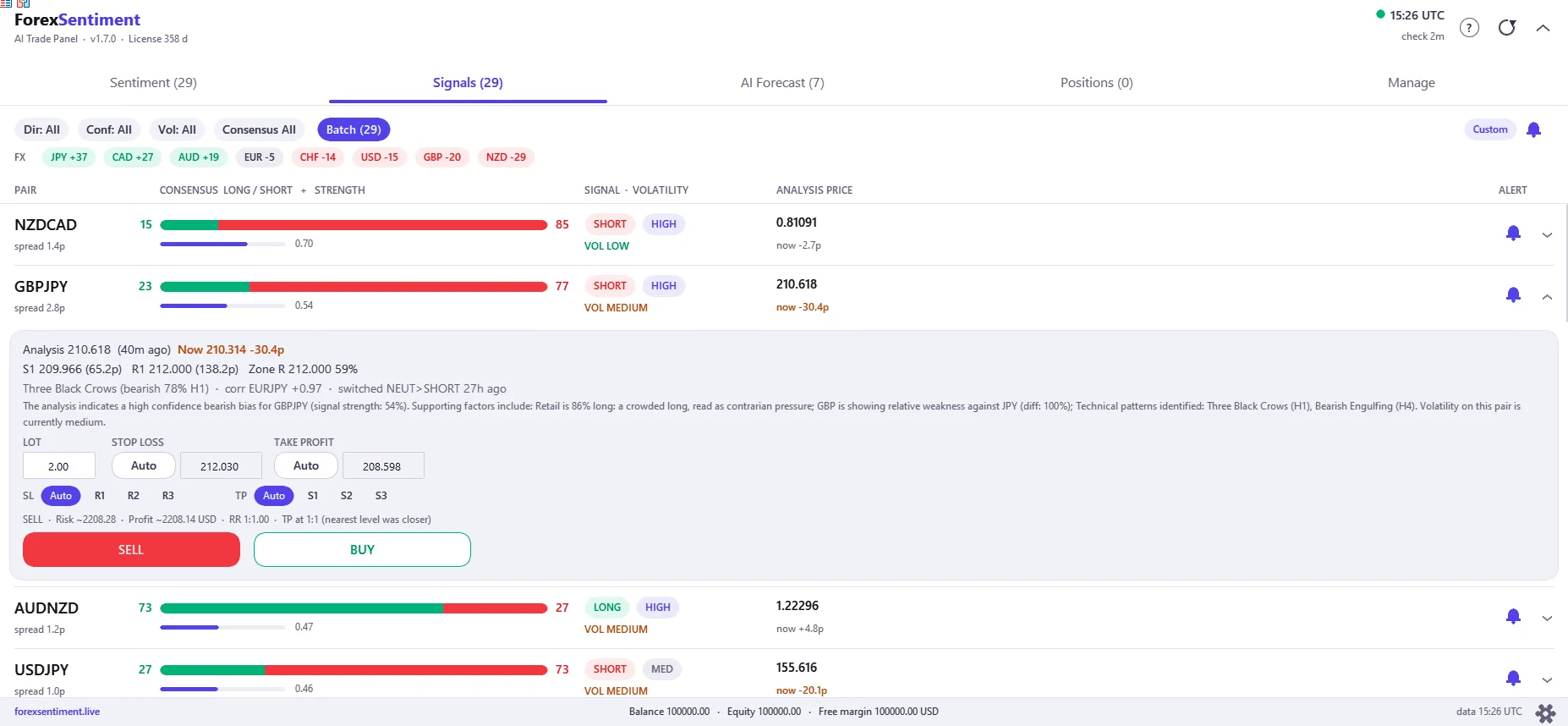
The Signals tab of the Trade Panel (version 1.7.0): one market per row, the GBP/JPY row expanded with its levels, the text of the reading and the order form.
On the AI Forecast tab a row is a plan: direction, entry type and price, stop, two targets to choose from, the reward-to-risk ratio and the expected value per unit of risk, with the record of that pair shown next to the plan. Markets the model reads as directionless carry no plan and are marked neutral; on a typical day only part of the 29 markets carry one. The last two tabs are Positions, which lists what is open (by default only the panel's own trades) with one-click breakeven (the stop moved to the entry price) and close, and Manage, which holds the optional account protections described below.
How an Order Goes Out
The operational heart of the panel is turning the manual routine described above into a few clicks. The plan of the day arrives with everything set: the entry price, as a limit order at the plan's price rather than a market entry; the stop; the target, chosen between the plan's two; and the expiration, aligned to the hours the plan was built for (the window runs from 19:00 New York time to 16:00 the next day). If the price has already gone past the entry, the panel says so and does not place the pending order, which at that point would have to be a stop order, the opposite of what the plan intended; a trader who still wants in can switch the entry to At market, which keeps the plan's stop and target and recomputes the risk. The lot can be a fixed size or computed from a risk percentage: choose to risk 1% of the account, and the panel sizes the position from the distance to the stop.
The most visual part is composing orders by dragging on the Chart Panel. Move the stop line on the chart and the panel recomputes the distance in pips, the money at risk in the account currency, the lot and the reward-to-risk ratio, before anything is sent. Anyone who has read about position sizing knows how often those calculations are done badly or skipped altogether; here they are automatic and visible before the click. On a pending order already placed, the entry line can be dragged too: the stop and target move with it by the same distance, in the same request to the broker, so the risk does not change.
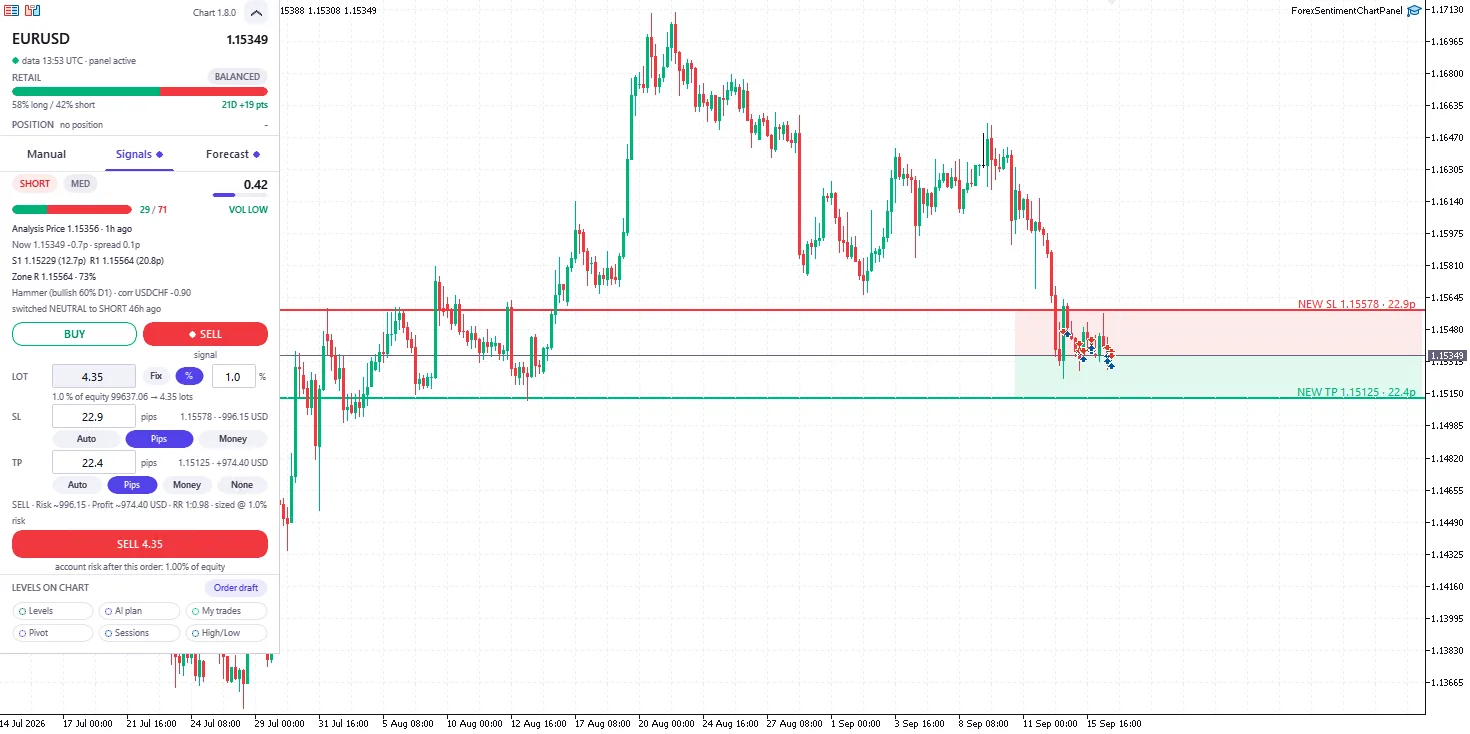
The Signals tab of the Chart Panel: the site's reading for this market, its levels, and the order form with the stop and target drawn where they would sit on the candles.
Then there are functions for people who follow several markets. The Batch view lets the trader tick several signals or plans, set a single lot, stop and target policy for all of them, read the combined risk in money and as a percentage of equity, and send them with one button. And before every confirmation there is an exposure check: if the order would add a position correlated with one already open, or stack a currency across several trades, the panel warns in the confirmation window. Those details describe the design of the tool: more risk management than signal generation.
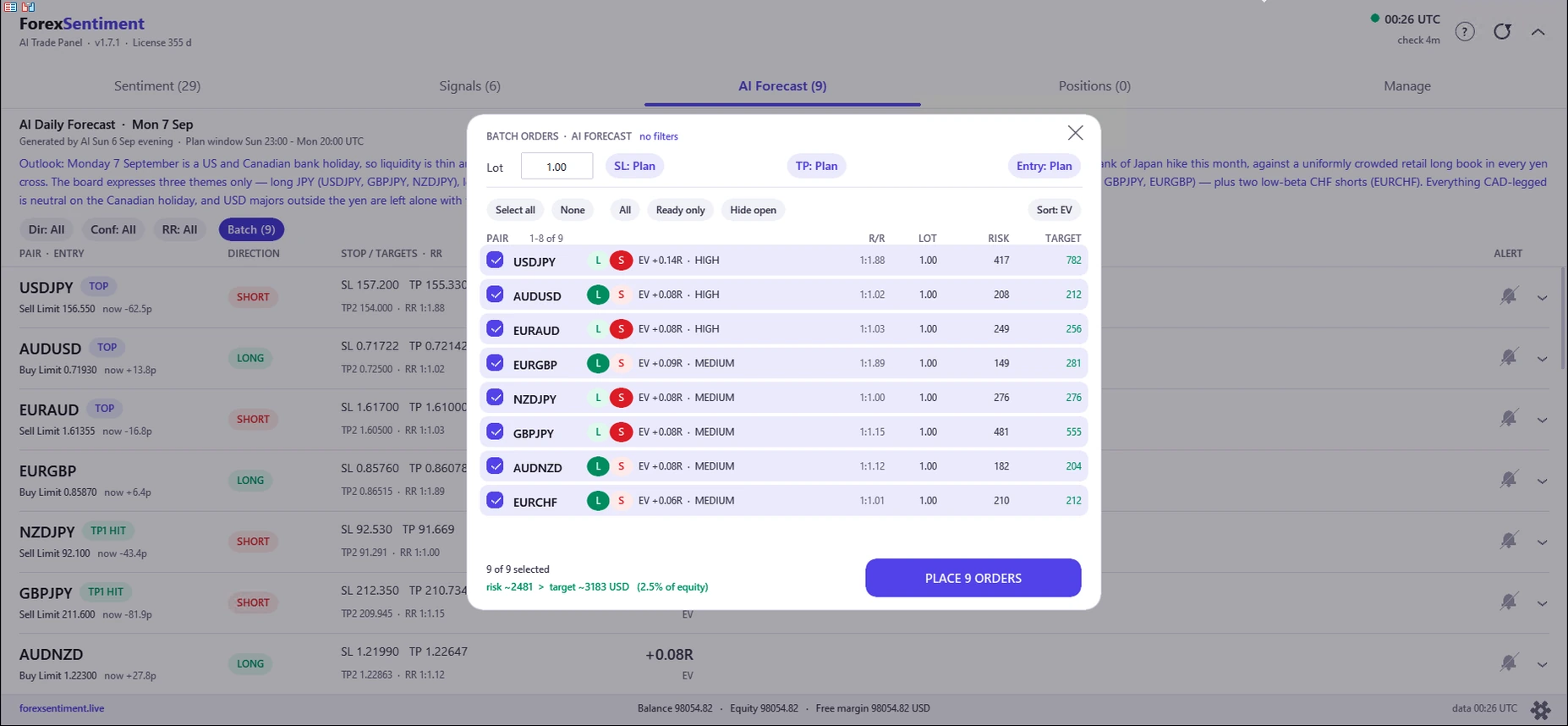
The Batch view (version 1.7.1, 7 September 2026): nine plans selected, one lot policy for all, and the combined risk as a share of equity before anything is sent.
What It Never Does
This is the part that sets the panel apart in a market full of robots promising miracles: an explicit list of what it will never do. First, it never opens, reverses or adds to a position by itself. Every order starts from the trader's click and passes through a confirmation window, on by default. The confirmation can be switched off, but in three cases it is always asked: orders sent from the Batch view, closing all positions, and any order without a stop loss. Second, there is no martingale, grid or averaging-down logic anywhere in the code, and no setting can add one. If a position goes against the trader, the panel does not double it.
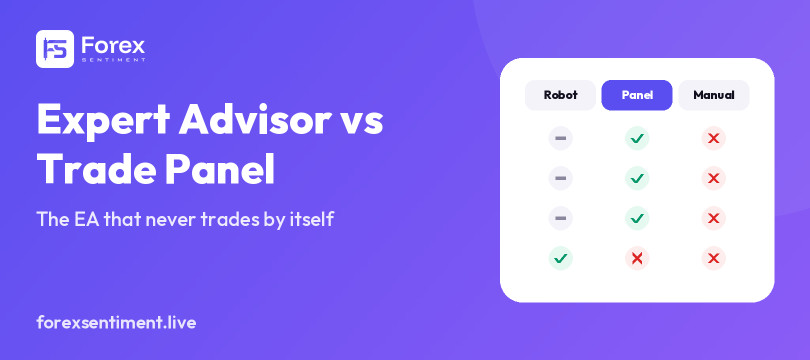
The only automations are optional protections that do nothing until the trader switches them on, and they can only close or protect what is already open, never open anything new: a ceiling on floating loss and on floating profit, a trailing stop on the whole account that follows each new profit peak, the stop moved to entry when an AI plan reaches its first target, a close before the daily rollover (the broker's day change, when spreads widen), and, since version 1.8.0, a trailing stop on a single position, set from the Chart Panel as a real stop loss held by the broker. Breakeven on that side panel is a button the trader clicks, not an automation. The whole distinction between a robot that decides and a panel that executes is laid out in expert advisor vs trade panel.
That architecture has a practical consequence for one group of traders: those on funded prop-firm accounts. Because the panel cannot open positions on its own, it belongs to the family of discretionary tools that support manual trading, not to the family of trading robots, and many firms accept Expert Advisors used that way. Rules differ from firm to firm and change over time, so each trader has to check the current rulebook of their own firm; FTMO's rules on EAs, read line by line, show what such a rulebook looks like.
The Record Is Published, Win or Lose
Another element worth attention is how the results of the daily plans are treated. There are no backtests, by stated choice. The site publishes one kind of result only: each plan, verified against the real candles of its session once that session has ended, and put online whether it won or lost. Every plan is published the evening before in a dated archive open to anyone; the entry is a limit order, so it fills at the published price or not at all; and plans whose entry price was never reached are excluded from the count instead of being scored as wins. There are three outcomes: target reached without touching the stop, stop hit, or order filled and neither level reached before the window closed. Minute-by-minute prices decide which level came first (hourly candles where the minute record is incomplete). The record is compiled by the site's own script and is not certified by a third party. The panel shows the same numbers next to each plan, pair by pair.
The product page states the statistical limits of its own sample. The verified record covers weeks, not years; the site itself calls it an early record rather than a track record, and publishes the uncertainty around its own figures, so the reader can judge how much weight they can bear. The current state of the record, plan by plan, is on the AI Daily Forecast page. The product page also makes clear that the AI plan is one tab of five: the retail positioning, the signals, the sizing and stop tools, the exposure check and the protections work on every covered market whatever the AI says that day.
Requirements and Things to Know First
The panel runs on the MetaTrader 5 desktop terminal only; there is no MetaTrader 4 version. It works with any MT5 broker, on hedging or netting accounts, demo or live, and resolves symbol suffixes (EURUSD.raw, EURUSD.m and the like) on its own. MetaTrader 5 runs one Expert Advisor per chart, so the Trade Panel takes a chart of its own and each Chart Panel takes the chart it works on; the Trade Panel has to stay open on some chart, because it is the one supplying data to the Chart Panels, which otherwise say so and stop placing orders.
A VPS (a virtual private server, a remote computer that stays on around the clock) is not required: the panel runs in the trader's own terminal. One thing follows from that: signals, plans and protection rules work only while the terminal is open. Orders already sent to the broker (pending orders, stops and take-profits) live on the broker's side and are untouched by a closed terminal, but anyone who wants the protections watching positions while away has to keep the terminal running, on a PC or on a VPS. If the site cannot be reached, the panel keeps working on the last data it saved for up to 72 hours. On markets outside the 29 (indices or cryptocurrencies, for example) the Chart Panel still works as a lot calculator and order composer on the chart, but without retail positioning, a signal or a plan for that symbol.
Setup takes a few minutes, once: allow the site's address under Tools, Options, Experts ("Allow WebRequest for listed URL"), turn Algo Trading on, drop the Trade Panel on a chart and paste the license code. The Chart Panel goes on afterward, on whichever charts the trader wants it, and asks for no code. A license runs on one MT5 account at a time and can be released and moved to another account from the trader's own licenses page, without a support ticket; the account can be a demo or a live one. Prices and subscription options are on the product page and are not repeated here. The complete user guide is public, in four languages, covering installation, activation and every screen and setting, so all of it can be read before spending anything.
Who It Is For, and Who It Is Not
The natural user is the discretionary trader who works the forex market by hand and wants the mechanical part of the job removed: someone who already follows analysis and signals and places orders manually, who cares about precise position sizing and exposure control more than about yet another source of signals, and who may trade a prop account that allows EAs for manual trading. Anyone who simply wants the levels, the sessions and the risk arithmetic drawn cleanly on the chart gets a daily working tool in the Chart Panel.
It is not the right tool for someone looking for a system that trades alone overnight: by design this panel never opens a trade without the trader. It is not for anyone who wants martingales or grids (they do not exist in the code), not for MetaTrader 4 users, and not for anyone expecting guaranteed results. As the product page itself states, it is a decision-support and execution tool, and the decisions, with their outcomes, remain the trader's. No panel, signal or algorithm removes the risk of trading, and a tool that changes how an order is placed does not change whether the trade was a good idea.