
An MT5 trade panel, also sold as a "trade manager" or "trade assistant", is an Expert Advisor that sits on a MetaTrader 5 chart and does the arithmetic around a trade: the lot size from the risk you accept, the stop and target attached at the moment of the click, the management of the position once it is open. Most panels stop there; the plan itself stays your job. This guide covers what a panel adds to MT5, the five jobs worth paying for, where the plan comes from, and how the free and paid options compare.
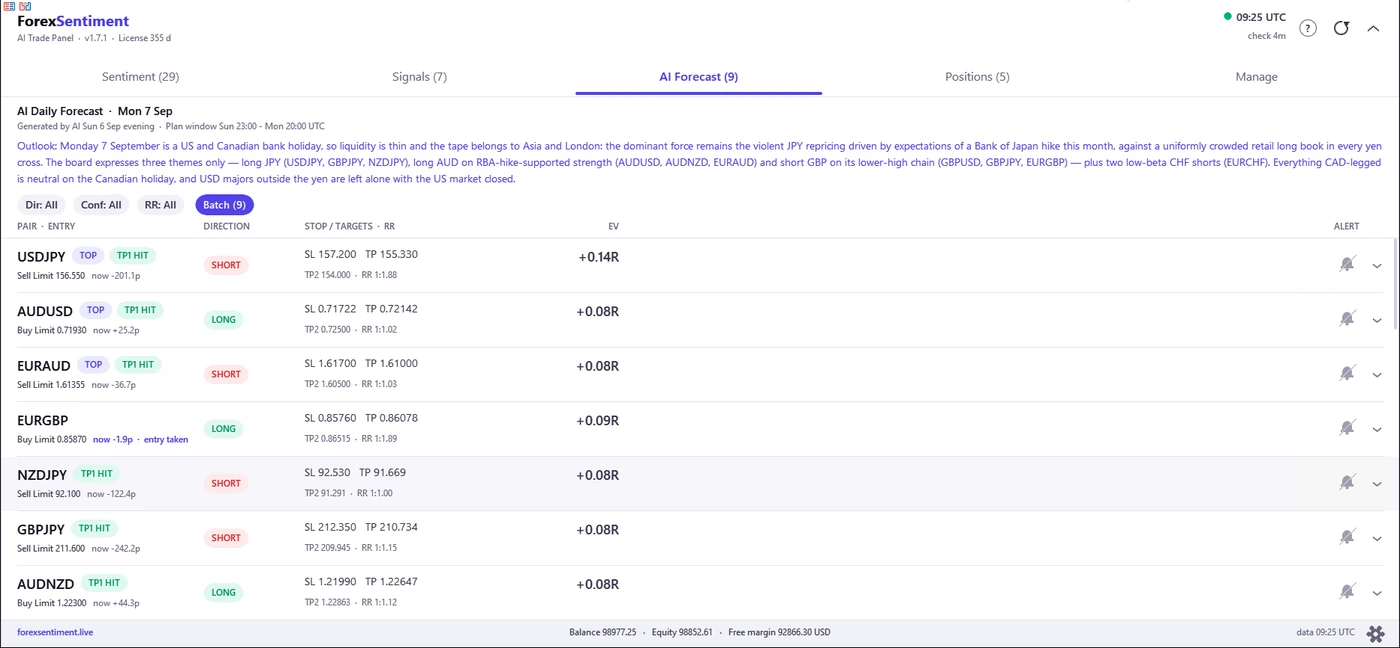
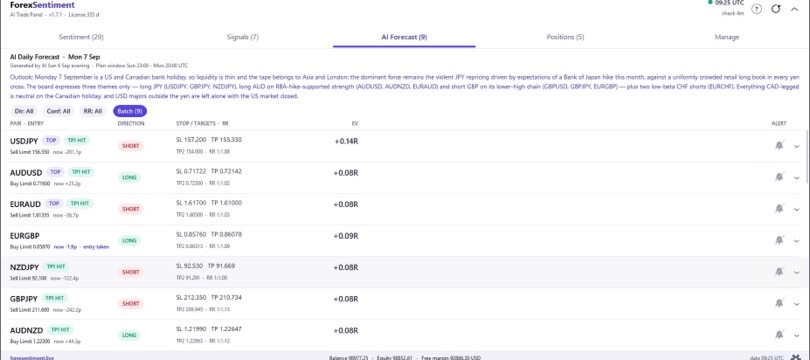
The AI Forecast tab of the ForexSentiment panel (version 1.7.1, 7 September 2026): one plan per row, with entry type, stop, two targets, reward-to-risk and expected value.
What a Trade Panel Is, and What MT5 Already Gives You
MetaTrader 5 ships with its own one-click tool. According to the MetaTrader 5 help, you switch it on from the chart's context menu ("One Click Trading"), a small panel appears on the chart, and the first time you use it the platform asks you to accept its terms; the option can also be pre-allowed in the platform settings. It sends a buy or a sell market order for the volume typed in the box, and it does so without a confirmation dialog: the same help page warns that a position closed from the panel "will be immediately closed without additional confirmation". The full setup, and the documented reasons the box sometimes does not show, are in the one-click trading in MT5 guide.
That is the whole feature. What it does not do is the part that costs traders money: no lot from a risk percentage, no stop or target attached as the order goes out (they are dragged onto the chart afterward), no view of what else is open on the account, and pending orders only through the chart's Trading submenu ("Pending orders can be placed from the chart using the Trading submenu of the chart context menu", says the same help), at the clicked price and without an expiration. If the panel "is not showing", the usual causes are the context-menu option being off or the small arrow to the left of the OHLC line having collapsed it: settings, not faults.
Trade panel, trade manager, expert advisor: three names, two things
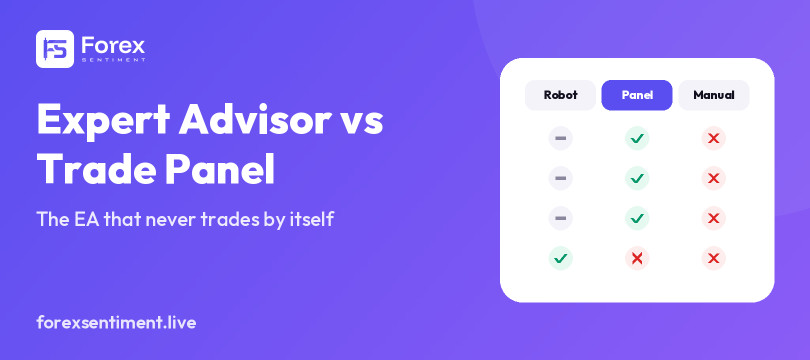
The vocabulary is loose: on the MQL5 Market the same category is called a trade panel, a trade manager, a trade assistant or a trading utility, and technically every one of them is an Expert Advisor, because an EA is simply a program MT5 runs on a chart. The distinction that matters is who decides the entry: a trading robot opens positions on its own rules; a panel or manager acts only when you click, and some add automations that manage what you opened. The ForexSentiment AI Trade Panel belongs firmly to the second family: it never opens a trade by itself, and its automations can only close or protect positions that already exist. The longer version of that distinction is in expert advisor vs trade panel.
The Five Jobs of a Trade Manager
Strip the marketing off any panel and the useful work comes down to five jobs. Judge a product on how it does each of them, not on how many functions it lists.
1. Position size from the risk you set
The formula is short: lot size = amount you are willing to lose ÷ (stop distance × value of one pip per lot). With a $10,000 account, 1% risk and a 25-pip stop on EUR/USD, that is $100 ÷ (25 × $10) = 0.40 lots. The traps are in the pip value: on a yen pair a pip is 0.01 and its dollar value moves with USD/JPY; on gold the unit is a point, and the contract size differs by broker; on a cross like EUR/GBP the pip is worth pounds and has to be converted into your account currency. A panel that reads the contract specification from the broker gets these right every time; a trader doing it by hand at 8 a.m. does not. For the risk percentage itself, see position sizing and how much to commit per trade, and for stops that scale with the market's range, position sizing in volatile markets with ATR. The site has a free forex lot size calculator that applies the same formula, market by market, with the lot rounded down.
2. Entry, stop and target in one click
The second job is to send the order with its stop and target already attached, so that a position never exists for even a second without protection. Three order types cover it: a market order fills now; a limit order waits for the price to come back to a level you name (a buy limit below the market, a sell limit above); a stop order waits for a break through a level (a buy stop above, a sell stop below). A pending order should also carry an expiration: an order left "good till canceled" can fill days later in a market that no longer resembles the one it was designed for. Where the stop itself belongs — structure, ATR, and the rule the nightly plan applies — is the subject of where to place a stop loss in forex.
A subtler point separates a plan from a wish: a plan with a fixed stop and target is only valid at one entry price. Enter 15 pips away from it and the risk, the reward-to-risk ratio and any probability attached to the plan describe a trade you are not taking. That is why the daily plans on this site are published as limit orders at a stated price: the order fills at that price, with exactly the numbers published, or not at all.
3. Managing the trade once it is open
Break-even (the stop moved to the entry once the trade has traveled a set distance), a trailing stop that follows new highs, a partial close at the first target, and a close a few minutes before the daily rollover, when spreads widen and a stop can be taken at a price the market never really traded. Good implementations do these on your instruction and say what they did; bad ones do them silently. Not every panel does all of them: the ForexSentiment panel has one-click break-even, a "plan autopilot" that moves the stop to entry when a plan's first target is touched, and an account-level profit trail that closes everything at a trailed level; since version 1.8.0 the Chart Panel adds a per-position trailing stop, but there is still no partial close. Its rollover close is opt-in, timed a few minutes before the broker's own daily boundary, or before the session close when that comes first (a Friday, or metals). Trade management after entry goes through each of these, including the partial close, which the ForexSentiment panel does not do.
4. Account protection, and what prop firms actually check
The fourth job is a ceiling on damage: a maximum floating loss for the account or for the panel's own trades, a profit ceiling that closes everything once open profit reaches a level you set, and a trail that follows the open-profit peak. On a funded or prop-firm account this is not a nicety: many firms publish a daily loss limit and a maximum drawdown, and breaching either usually ends the evaluation or the account whatever the trade does afterward. Rules differ between firms and change over time, so read the current rulebook of the firm you trade with; the mistakes that most often end an evaluation are covered in are EAs and trade panels allowed at prop firms. What matters for the choice of a panel is one line in the small print: does it ever open, reverse or scale a position on its own? A tool that only closes is a discretionary aid; a tool that can open is an automated system, and that is the distinction a firm's rules are likely to turn on. FTMO’s rules on EAs and panels, read line by line, are in are EAs allowed at prop firms.
5. A whole shortlist in one pass
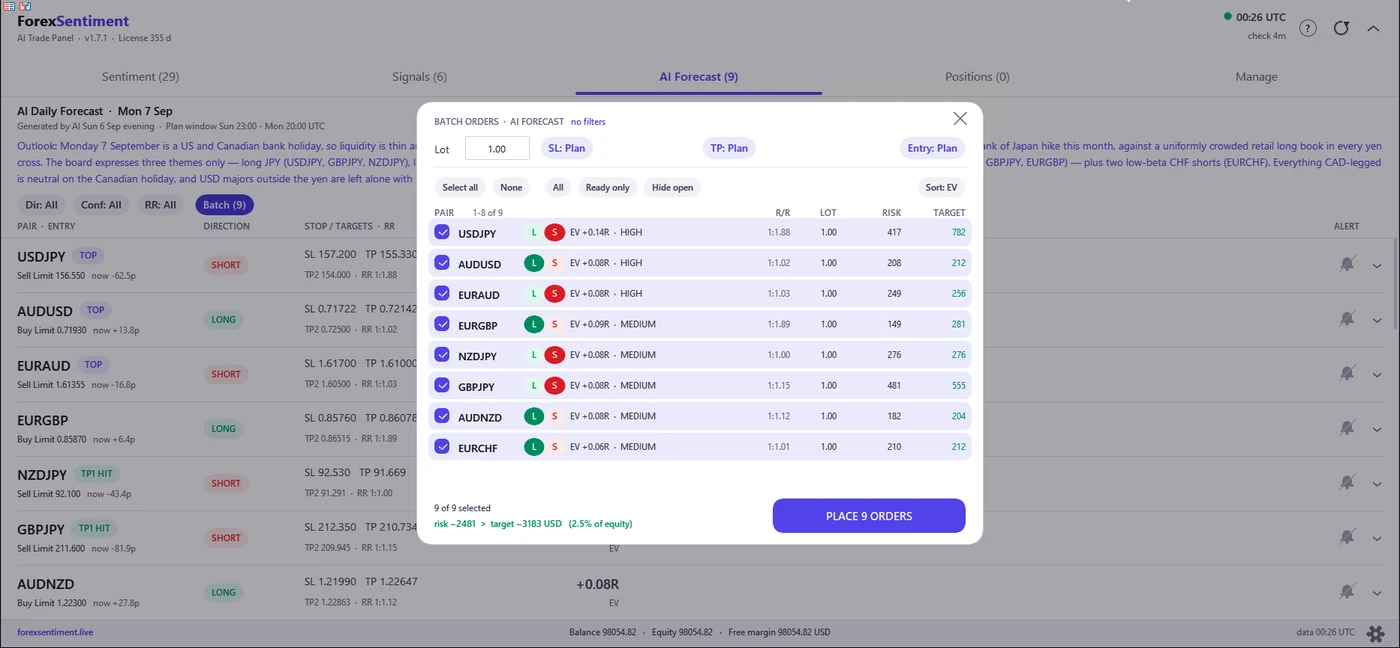
The fifth job only exists in panels that carry a list of ideas rather than one chart: tick several rows, set one lot, stop and target policy for all of them, read the combined risk as a share of equity, and send them together. It sounds like convenience and it is actually risk control: a trader placing nine orders by hand at 7 a.m. has nine chances to mistype a price or a lot, and no view of what the nine add up to.
The Missing Piece in Most Panels: Where the Trade Plan Comes From
Every product in the comparison below does the first four jobs to some degree; only the list-based panels attempt the fifth. None of them, except the one built by this site, answers the question that comes before all five: what is the trade? A manager assumes you already have an entry, a stop and a target. With a tested method that is the right division of labor; without one, faster execution just gets you into an unplanned trade faster.
A manual plan and an AI-generated daily plan
A manual trading plan is a written set of conditions: which markets, which setups, what stop, what target, what size, when to stand aside; the checklist in professional trading plan: a checklist is a good template. The AI Daily Forecast on this site evaluates each of the 29 markets (28 currency pairs and gold) once per trading session and, for the ones it reads as directional, publishes a plan of the same shape from the site's own analysis: a limit entry, a stop, two targets, the reward-to-risk ratio, an expected value per unit of risk, and a validity window from 19:00 New York time to 16:00 the next day. A typical board carries 8 to 15 directional plans; the one in the screenshots, for 7 September 2026, carries 9 of 29, with the rest marked neutral.
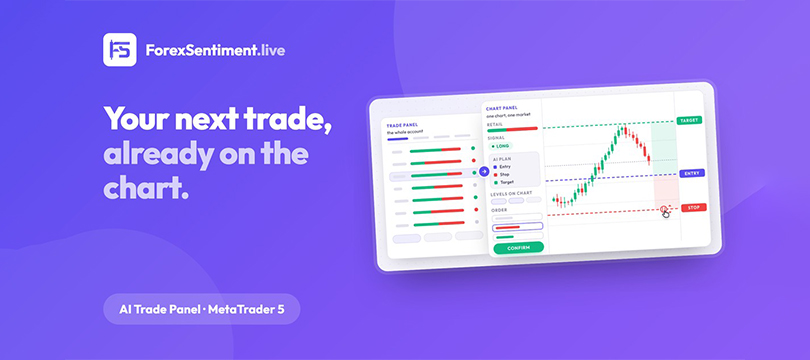
The AI Trade Panel puts that plan on the row: entry type, price, stop, targets, the expected value (TOP picks first, then sorted by it), and the pair's own record, verified on real candles by this site's own script, as the next section explains. The order goes out as the plan says (a limit stays a limit, expiring at the end of the plan window) or, if the price has already reached the entry, at market with the same stop and target and the numbers recomputed on the actual fill. If the price has gone past the entry, the panel says so and places nothing rather than turning the plan into its mirror image.
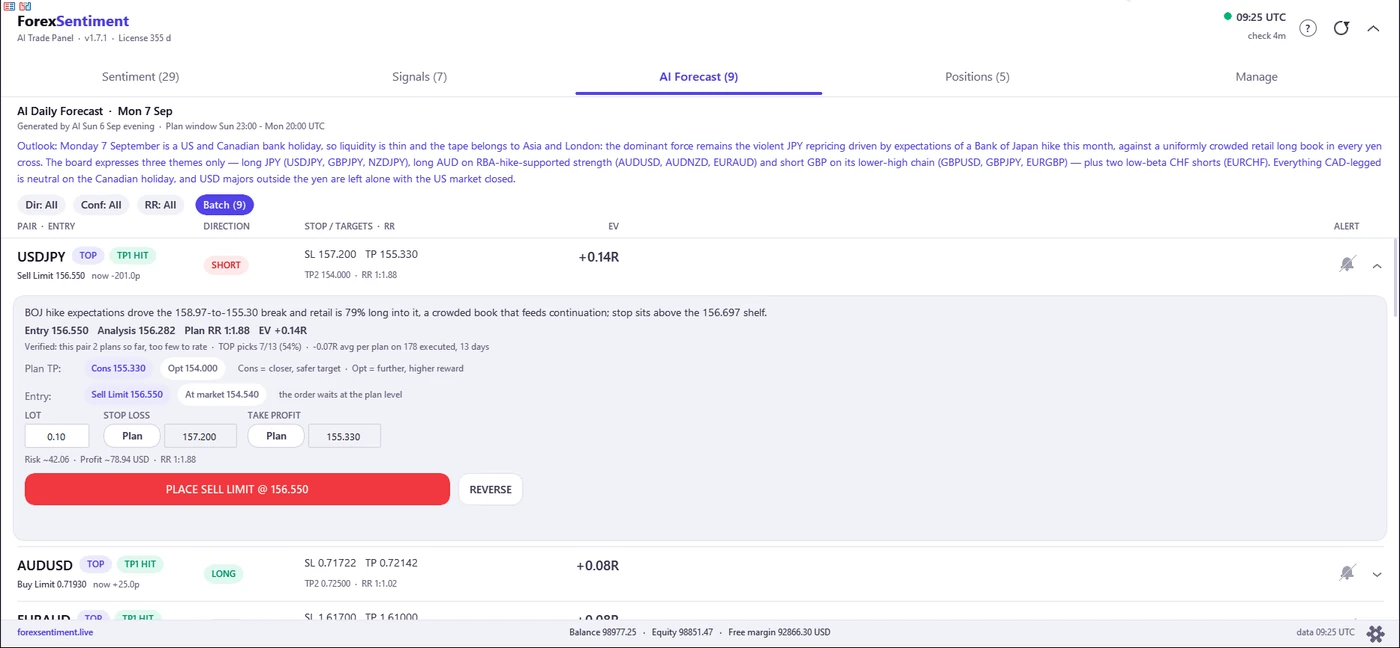
One plan opened: the plan's reasoning, its record line (as of 7 September 2026), the two targets to choose from, entry at the plan level or at market, and the order form with risk and reward computed for the account.
How a plan is verified on real candles
What separates a plan from a signal-channel screenshot is that the outcome is measured afterward and published either way. When a plan's target day ends, a script on this site reads the real candles of that session and assigns one of three outcomes: target reached without the stop being touched; stop hit; or order filled and neither level reached before the window closed, in which case the plan expires and is scored at the closing price relative to the entry. Minute-by-minute prices decide which level came first (hourly candles where the minute record is incomplete); a level touched before the order filled does not count, and when stop and target land in the same minute the tie goes to the loss. Plans whose entry was never reached are excluded rather than scored as wins. The record is compiled by this site's own script, not audited by a third party, and published win or lose. The current summary, read from the published record each time this page loads:
The verified record, as it stands today. Every figure below is read from the published record when this page loads; the record grows by one session every trading evening.
- The three plans picked each session: 96 filled plans over 46 verified days, average result +0.06 × the risk taken per plan. Target reached on 16%, stop hit on 25%, expired before either level on 59% of them. On a sample this size the average carries a range from -0.07 to +0.18 per unit risked, wide enough to include zero.
- Every plan on the board, including the ones marked not to take: 363 filled plans, average result -0.05 × the risk taken; stop hit on 23%, expired on 66%.
Compiled by this site's own script on real candles, published win or lose, not audited by a third party. Neither number is proof of anything yet: the sample is small and it is published anyway.
The full record, plan by plan and day by day, lives on the Daily Forecast page, and the panel shows the record next to each plan.
Why expected value beats win rate
A win rate on its own says nothing about money, because it ignores how much a win pays and how much a loss costs. With three possible outcomes the honest number is the expected value per unit risked: the target's payoff times its share of outcomes, minus the share of full losses, plus the share that expire before either level times their average result. The plans on this site publish this figure ("EV") for every directional plan, computed from the plan's geometry, the model's own estimate of reaching the target (discounted, because the record has not yet borne out the advantage over chance that the model claims), and the outcome mix of the published record (how often plans time out, and what they return when they do); TOP picks come first and the rest of the list is sorted by it. So a plan can have a modest chance of reaching its target and still be worth taking if the target is far and the expirations tend to close in profit, and a plan with a high win rate can be a losing proposition. The arithmetic is worked through in trading expectancy: how to calculate it correctly.
Retail Sentiment Inside the Panel
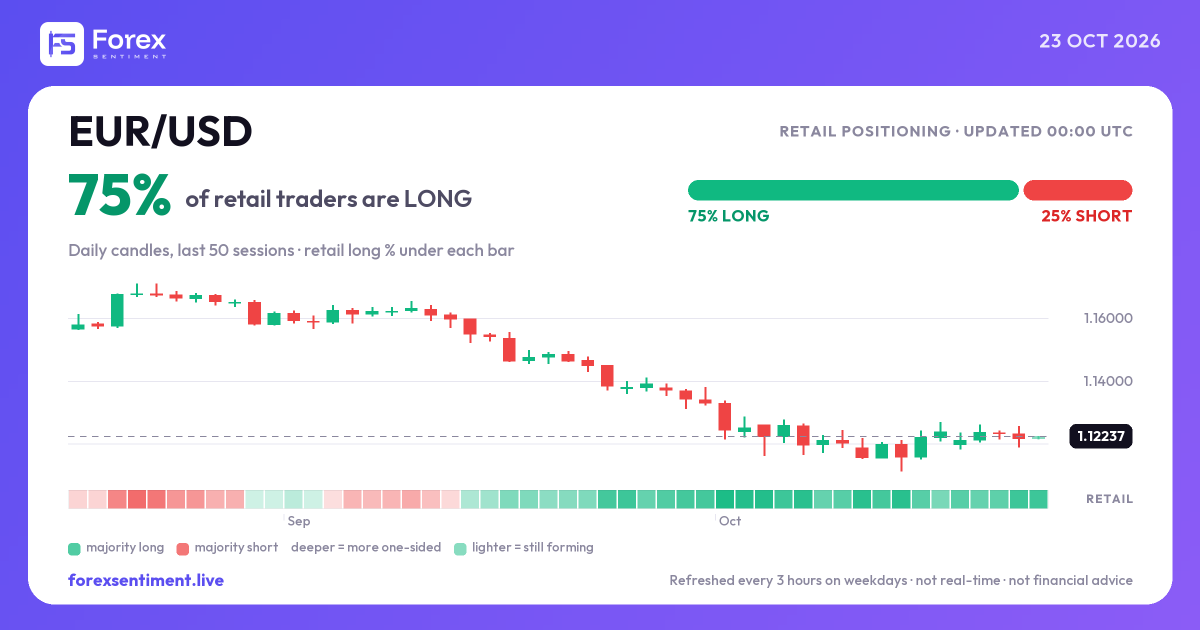
The panel's first tab is not the plan but the crowd: for each of the 29 markets, the share of retail traders positioned long and short, with the history over 7, 21 or 30 days. The figure is an estimate of retail positioning blended from more than one source and refreshed about every three hours on weekdays; it is not a count of traders and it is not real-time. The reading is contrarian, as the site's signal engine reads it: a book heavily on one side has usually chased a move that has already happened, so a "crowded" reading (60% or more on one side) or an "extreme" one (75% or more) is a caution about joining the crowd rather than an invitation. Using that number without over-trusting it is the subject of forex retail sentiment explained: what the number means and how to read it against the crowd; the positioning for any pair is on its analysis page, for example EUR/USD. What the number is made of, and how the engine reads it against the crowd, is explained in forex retail sentiment explained.
Prop-Firm Compliance Checklist
- Does the tool open positions on its own? If yes, that is what a firm's rules are likely to mean by an automated system. The ForexSentiment panel does not: every order starts from your click and, by default, a confirmation dialog (batch orders and close-all always ask).
- Are the automations close-only? Break-even, trailing, loss ceilings and rollover closes act on positions that already exist. Rules on those vary; read the wording.
- Can you size by a percentage of equity or balance? Firms measure the daily loss limit against different bases (equity, balance, or the higher of the two at the start of the day); check which one yours uses and size from the same base. The panel sizes by fixed lot, percentage of equity or percentage of balance.
- Is there an exposure check? Three positions on three yen crosses are one bet on the yen; the panel warns before you confirm when a correlated position is already open or a currency is stacked across your trades.
- Does the terminal need to stay on? Protections that live in the panel only run while the terminal runs; stops and targets sent to the broker do not need it. Decide about a VPS on that basis.
- Is the firm's rule current? Rulebooks change; nothing in this guide substitutes for the version in force on the day you trade.
Choosing a Trade Panel: Free vs Paid, MQL5 Market vs Vendor
The market splits into three groups: a free, open-source position sizer; the established MQL5 Market utilities, sold outright or rented; and vendor panels sold outside the Market. Prices, rentals, review counts and versions below are as displayed on each product's page on 7 September 2026; they change, so check the page before buying.
- Position Sizer (EarnForex): free and open source, for MT4 and MT5, with the source code on GitHub. Risk-based lot from draggable entry, stop and target lines, ATR-based stops, a trade button that sends the order with its stop and target, plus trailing, break-even and multiple take-profit levels. Latest release 3.16a for MT5, 31 August 2026. No plan, no sentiment, no record: it manages the trade you bring. Product page.
- Forex Trade Manager MT5 (InvestSoft): $99 to buy or $30 for a three-month rental, free demo, 756 reviews at a 4.98 average (as displayed 7 September 2026). Risk-based lot, stop and target management, break-even, trailing, partial close and equity protection. Version 3.70, updated 18 June 2026. Market listing.
- Trade Assistant MT5 (Evgeniy Kravchenko): $100 to buy or from $30 to rent, free demo, 166 purchases a month by the Market's counter (as displayed 7 September 2026). Risk as a percentage of balance, equity or free margin, order lines on the chart, partial closes, seven types of trailing stop. Version 10.33, updated 29 April 2026. Market listing.
- TradePanel MT5 (Alfiya Fazylova): $100 to buy or from $40 to rent, free demo, and the longest function list of the group (over fifty, by the vendor's count): one-click orders with automatic risk calculation, order grids, reversing and locking a position, group closes. Version 20.91, updated 26 August 2026. Some of those functions, the grid in particular, are the kind of automation a prop firm may not allow. Market listing.
- ForexSentiment AI Trade Panel: MT5 only, any broker. Jobs 1, 2, 4 and 5 above in full; job 3 as one-click break-even, plan autopilot, an account-level profit trail and, since version 1.8.0, a per-position trailing stop and breakeven on the Chart Panel (the side panel that comes in the same zip file); no partial close. Plus the two layers the others leave to you: the AI daily plan on the row (entry, stop, two targets, expected value, validity window, verified record) and the retail positioning of 29 markets with its history, the site's signals and a currency-strength strip. Exposure guard before every confirmation, close-only protections, batch orders, alerts by popup, sound, push or email, and your own performance split by trade type. It never opens a trade by itself. Sold by this site as a 7-Day Pass or a subscription, one MT5 account per license, manual public before purchase; pricing and details are on the panel page. A screen-by-screen look at what it shows and how an order goes out is in the trade panel for MetaTrader 5 walkthrough.
"Free download" and cracked panels
Searches for trade managers are full of "free download" and "cracked" versions. Ethics aside, a cracked EA on a live account is a bad trade on its own terms: the binary can carry anything, it will not get the updates that keep it working after a terminal build changes, and the vendor's support is closed to it. The honest free option is Position Sizer above; for the ForexSentiment panel, the low-cost test is the 7-Day Pass, usable once per email address and once per MT5 account.
Setting Up a Panel on MT5
Every EA follows the same installation path in MetaTrader 5; the ForexSentiment panel's steps, from its public user guide, show where things go wrong.
- Copy the .ex5 file into the terminal's data folder: File → Open Data Folder, then MQL5 → Experts. Refresh the Navigator (right-click Expert Advisors → Refresh) or restart the terminal.
- Allow the data connection: Tools → Options → Experts, tick "Allow WebRequest for listed URL" and add the vendor's address exactly (for this panel, https://forexsentiment.live, the only address it talks to). Without it the panel opens but loads nothing.
- Enable algorithmic trading at both levels: the global switch (the checkbox at the top of that Options tab, which the Algo Trading button in the toolbar mirrors) and, when you attach the EA, the permission on its Common tab. MT5 requires both, even for orders you send by hand from a panel.
- Drag the EA onto a chart. In the dialog, confirm the Common-tab permission from step 3 and fill the Inputs tab (for this panel: license code, magic number, panel size). The panel takes over the whole chart, so give it one of its own; F7 reopens the inputs at any time.
Two rejections come up with any panel. "Invalid price" usually means the entry sits inside the broker's minimum stop distance or freeze level; a broker that declares a stops level of zero has not promised that there is no limit, and a good panel measures the distance itself before sending. And some ECN accounts refuse an order that arrives with a stop and target attached; the ForexSentiment panel retries without them, adds the stops with a modification straight after, and writes what it did in the MT5 Journal. Prices are normalized to the symbol's tick size, which matters on gold, where the tick is often 0.05 with two decimals.
Pricing and Licensing
Prices are not repeated here because they age; they are on the panel page, with what each plan includes. What does not change: every feature is in every plan; one license binds to one MT5 account, not to a computer, so a VPS or a reinstall needs nothing; a license moves to another account only when you unbind it yourself; and the 7-Day Pass, meant for testing, works once per email address and once per MT5 account.
Frequently Asked Questions
Does an MT5 trade panel trade on its own?
Some do, in part: TradePanel MT5, for example, can place order grids, which is an automation in its own right. The ForexSentiment panel does not. Every order starts from your click and, by default, a confirmation dialog (batch orders and close-all always ask); its automations can only close or protect what is already open, and there is no autotrading mode to switch on.
Is there an MT4 version?
No. The panel is MetaTrader 5 only. An MT4 port is being evaluated on demand, so people who need one should say so.
Is the data real-time?
No. Retail positioning and signals refresh about every three hours on weekdays, the AI plan is generated once per trading session, and every row shows the age of the analysis it came from. When the feed is late a banner says so, the panel never fills a gap with an estimate, and if the site cannot be reached at all it keeps working on the last data it saved for up to 72 hours.
How is the verified record computed?
By this site's own script, on the real candles of the session after it ends, with three outcomes (target, stop, expired) and unfilled orders excluded. It is published every trading evening, win or lose, and it is not certified by a third party. The numbers above are read from that record when the page loads.
Is a VPS needed?
Not to run the panel: it works in your own terminal. What stops when the terminal closes are the panel's protections and alerts; orders, stops and targets already sent to the broker live on the broker's side. Keep the terminal running, on a PC or a VPS, only if you want the protections watching positions while you are away.
The one-click panel in MT5 is not showing. Why?
Switch it on from the chart's context menu ("One Click Trading"); if it is on but collapsed, click the small arrow to the left of the OHLC line. The first order asks you to accept the platform's terms. It sends only market orders for a typed volume, so a stop, a target or a risk-based lot still needs a panel.
Related Tools and Further Reading
- AI Daily Forecast: the plans the panel places, with the verified record.
- Signals: the multi-factor reading on all 29 markets that the panel's Signals tab mirrors.
- Economic calendar: the releases the daily plan weighs as gap risk, and how to read one.
- where to place a stop loss in forex: where the stop belongs before any panel sizes the trade.
- The panel's user guide: installation, activation and every screen, in four languages.
How This Guide Was Made
Written from the ForexSentiment panel's public manual and its source, with competitor details read from each vendor's page on 7 September 2026 and the MetaTrader 5 behavior taken from the platform's help. Screenshots are from a MetaTrader 5 terminal running panel version 1.7.1, uncropped and unretouched. Trading involves substantial risk of loss and is not suitable for every investor: a panel changes how an order is placed, not whether the trade was a good idea.