

Forex trade management is everything that happens between the fill and the exit: whether the stop moves to breakeven, whether it trails, whether part of the position is closed early, and whether the trade is allowed to sit through the daily rollover. The uncomfortable truth is that a plan with a fixed entry, stop and target already has an outcome, and every intervention replaces it with a different bet. This article goes through each tool, what it does for a one-session plan and what it costs, and ends with the case for doing nothing. It follows the article on where to place the stop and belongs to the MT5 trade panel guide series.
The Plan Already Contains the Exit
Once a limit order with a stop and a target has filled, the position has three ways to end: the target is reached, the stop is reached, or the session closes with it still open. Those three outcomes are exactly what a record can be measured on, and that is how the AI Daily Forecast verifies its plans, on the real candles of the session, without anyone touching the trade after publication. Management is the decision to change one of the three numbers while the position is open. Sometimes that is right. But it is never free: a stop moved to entry is a new stop, a partial close is a new size, and a trade closed at 14:00 is a trade that no longer resembles the one on the record.
The useful mental model is that management should be decided before the fill, as rules, and executed without judgment during the session. That is also why trade panels put these rules in a tab with switches instead of leaving them to the mood of the moment.
Breakeven: When It Helps and When It Hurts
Moving the stop to the entry price removes the possibility of a loss on the trade. It also removes the possibility of the trade surviving a normal pullback, and that second effect is the one most traders underestimate. A stop moved to breakeven a few pips into profit is a stop placed inside the noise, the very mistake the placement article warns against; the trade is protected from a loss and exposed to a scratch on almost every retest of the entry.
The version that works is conditional: move the stop to entry once price has proved the idea by reaching a first objective, not once it merely looks green. In the ForexSentiment panel this is the Plan autopilot rule, which acts only on trades born from an AI plan and opened inside the plan's window, and moves the stop to entry as soon as the conservative target is touched. Before that moment the stop stays where the plan put it. There is also a one-click version for the trader who wants to decide by hand: "Set all SL to breakeven" in the Manage tab, and a breakeven button on each row of the Positions tab; the guide's section on the panel's positions and protections describes all three.
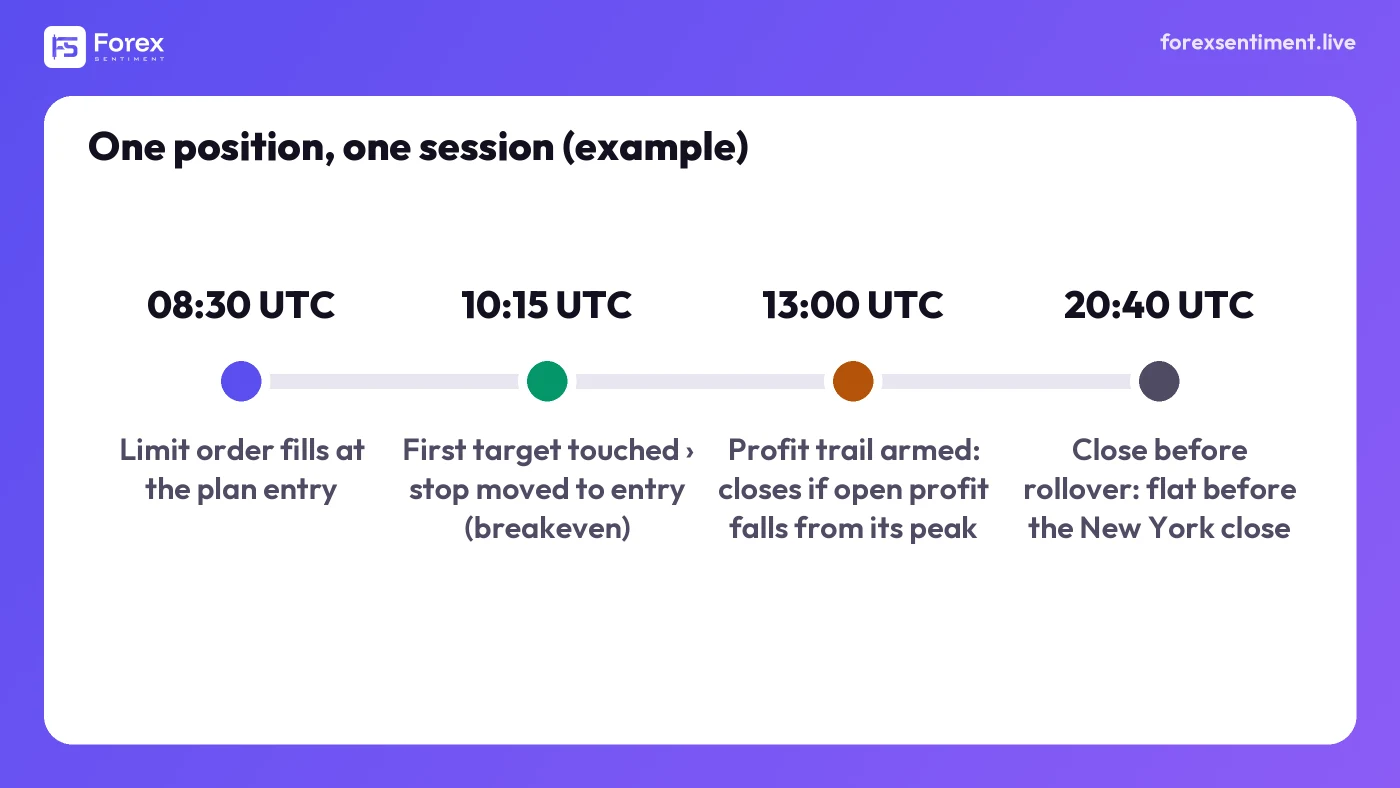
An example session, times illustrative, as the panel's rules would handle it: the limit fills, the stop goes to entry once the first target is touched, the trail arms on open profit, and everything is flat before the daily rollover.
Trailing: Per Position or Per Account
A trailing stop follows the price at a fixed distance and locks in part of an open gain. Two very different tools carry that name. The per-position trailing stop, the one MetaTrader offers from a position's context menu, runs on the client terminal, moves the stop order itself, and works only while the terminal is open. The account-level trail, which is what the ForexSentiment Trade Panel provides, does not touch any stop order: it arms once the open profit of the covered positions reaches a level you set, then closes them if that profit falls back from its highest point by the distance you set. Its armed state and its peak survive a terminal restart, because it is a rule on the account's floating result rather than a modified order; but like every Manage rule it runs only while the terminal is open, so on that point it is no different from MetaTrader's trail. What differs is what it does and when.
Be clear about which one you are using, because their failure modes differ. A per-position trail on a one-session plan tends to close the trade on the first sharp pullback, often before the target that justified the trade; since version 1.8.0 the Chart Panel offers that kind of trail, per position: you set two numbers, the profit at which it starts and the profit it locks in, and from there the stop follows the profit peak at that distance. It is a real stop loss deposited with the broker, so the protection already placed survives a closed terminal, although it stops advancing until a Chart Panel runs on that symbol again. An account-level trail is coarser and later, which suits a book of several plans better than it suits a single trade: it protects a good session as a whole rather than optimizing any one exit.
Partial Close
Closing part of the position at a first objective and letting the rest run is the classic compromise, and the Daily Forecast's own methodology page suggests it: consider taking partial profit at the conservative target. It is worth knowing what it does to the arithmetic. Half closed at 1:1 and half at 1:2 averages 1:1.5 on the trades that reach the far target; a trade that turns after the first target ends near flat instead of at −1R; a trade that never reaches the first target still loses the full 1R. Whether the sum beats holding the whole position for 1:2 depends on how often price gets from the first target to the second, a number to measure on your own history rather than assume; the article on trading expectancy shows how.
The panel does not do partial closes. Its plans carry two targets, conservative and optimal, and you choose one for the order; scaling out is done from MetaTrader 5 itself, by closing a smaller volume than the open one from the position's order window. If you rely on partials, that is a step to plan for before the fill, not a button to look for after it.
Close Before the Rollover
The forex day ends at the New York close, and around that hour spreads widen sharply as liquidity providers roll positions. A stop that sits a few pips beyond a level can be taken out by a spread that briefly doubles, on a price the market never really traded. The site's plans are written after that window on purpose and run from the evening to the following afternoon, New York time, so a plan that has not resolved by then is closed on the last hour's close rather than the daily one.
The panel's "close before rollover" rule automates the same discipline: switched on, it closes the covered positions and cancels the pending orders a chosen number of minutes before the daily boundary, or before the session close when that comes first, as on a Friday or on metals and indices. The boundary is read from the broker's own chart, so it follows the server's clock and the daylight-saving changes without any setting from you. It is opt-in, like every rule in that tab.
Account-Level Ceilings and the Warning Before the Click
Two more rules belong to management even though they act on the whole account rather than on one trade. A maximum floating loss closes the covered positions, the whole account by default or the panel's own trades, when the open loss reaches the ceiling you set, which is the mechanical version of a daily loss limit; a maximum floating profit does the same on the upside, for the trader who knows that a good morning is usually undone by an afternoon of trying to improve it. The Manage tab holds five such rules: the two ceilings, the profit trail, the plan autopilot's breakeven and the close before rollover, all opt-in and all close-only. The two ceilings are especially useful on funded and prop-firm accounts, where, at most firms, a daily limit breached by an open position ends the evaluation regardless of how the trade would have closed.
The last tool is not a rule but a warning, and it fires before the position exists. When a new order stacks exposure you already hold, because a position is open on a pair that moves with this one or because the same currency is already being pushed in the same direction by two or more positions, the confirmation dialog says so. Correlated trades are one trade wearing several names, and the moment to notice is before the click, not when three stops go together.
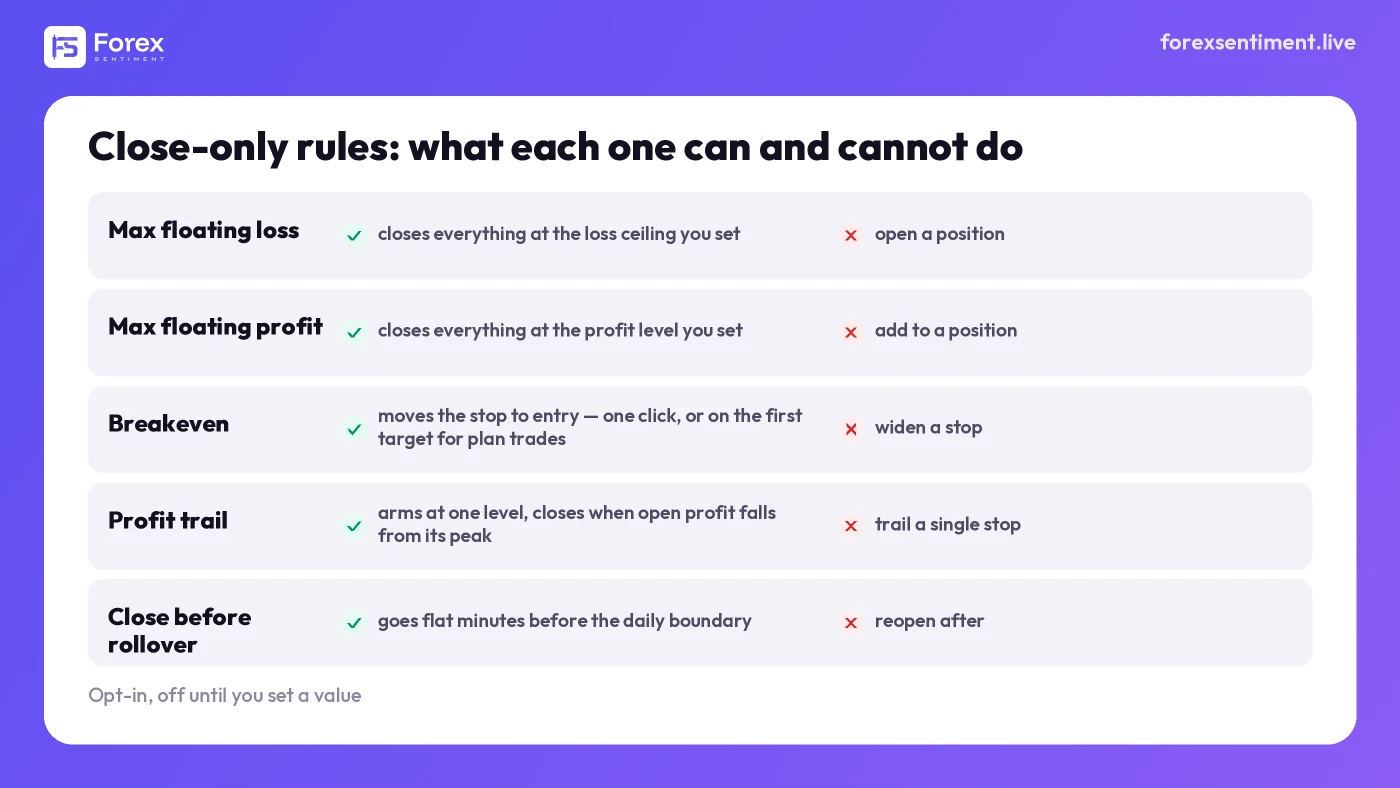
The five protections in the panel's Manage tab. Every one of them can only close or protect; none can open, add or widen.
When to Leave It Alone
There is a strong case, for a one-session plan with a sound stop and a target that clears 1:1, for placing the order and not touching it. The plan's outcome is then the one that was published and measured, which is the only way its record means anything for the next plan. Every intervention detaches your result from that record: a breakeven stop turns some winners into scratches, a partial turns some 1:2 outcomes into 1:1.5, a manual close at the first sign of trouble turns a plan into an impulse. None of these is wrong in itself. They are simply different trades from the one whose expectancy you were counting on, and they should be judged on their own numbers.
The practical rule is the one the panel is built around: decide the management before the fill, write it as a switch or a rule with a level, and let the session run. If a rule keeps firing too early or too late, change the rule tomorrow, not the trade today. The Manage tab of the ForexSentiment panel is built exactly for that separation: every protection is opt-in, every one of them can only close or protect, and none of them can open a position or widen a stop.
How This Article Was Made
The behavior attributed to the ForexSentiment panel is taken from its public user guide and its documented rules as of 8 September 2026, with the Chart Panel's trailing stop added on 3 October 2026 from the guide of version 1.8.0; MetaTrader's per-position trailing stop is described from the platform's own behavior. Timings in the figure are illustrative. Trading involves substantial risk of loss and is not suitable for every investor: management rules change how a trade ends, not whether it should have been taken.